How To Fix Portable Projector Focus Wheel Slipping?
A blurry image can ruin movie night in seconds. You turn the focus wheel on your portable projector, but the picture keeps slipping back out of focus. This is a common problem, and it can feel frustrating.
The good news is that a slipping focus wheel is usually fixable. You do not need to buy a new projector. In most cases, the issue comes from worn gears, loose components, or simple wear and tear over time.
This guide will walk you through why your focus wheel slips in the first place. You will learn how to spot the exact cause behind the problem.
We will also cover simple, step by step fixes you can try at home. These methods use tools you likely already have.
Most importantly, you will discover how to prevent this issue from happening again. A little care goes a long way in keeping your projector sharp and ready.
By the end of this article, you will know exactly how to fix that wobbly focus wheel. Your next movie night will look crisp and clear again.
In a Nutshell
Here is a quick recap of what we covered. Use this list as your go to reference.
-
Loose screws are often the main reason your focus wheel slips. A simple tightening fix can solve this fast.
-
Worn out gears inside the wheel mechanism cause slipping over time. This happens naturally with regular use.
-
Dust and debris build up can jam the smooth motion of your wheel. Cleaning it often prevents this problem.
-
You can fix minor slipping issues at home with basic tools. No need to visit a repair shop right away.
-
Regular maintenance keeps your focus wheel working smoothly. A little care goes a long way here.
-
Proper storage protects your projector from unnecessary wear. Always keep it in a safe, dry place.
Following these simple steps will help your projector focus wheel stay steady. You will enjoy clear, sharp images every time you watch something on the big screen.
Understanding the Focus Wheel Mechanism
Your portable projector’s focus wheel helps you get a sharp, clear image on your screen. Understanding how it works is the first step to fixing slipping issues.
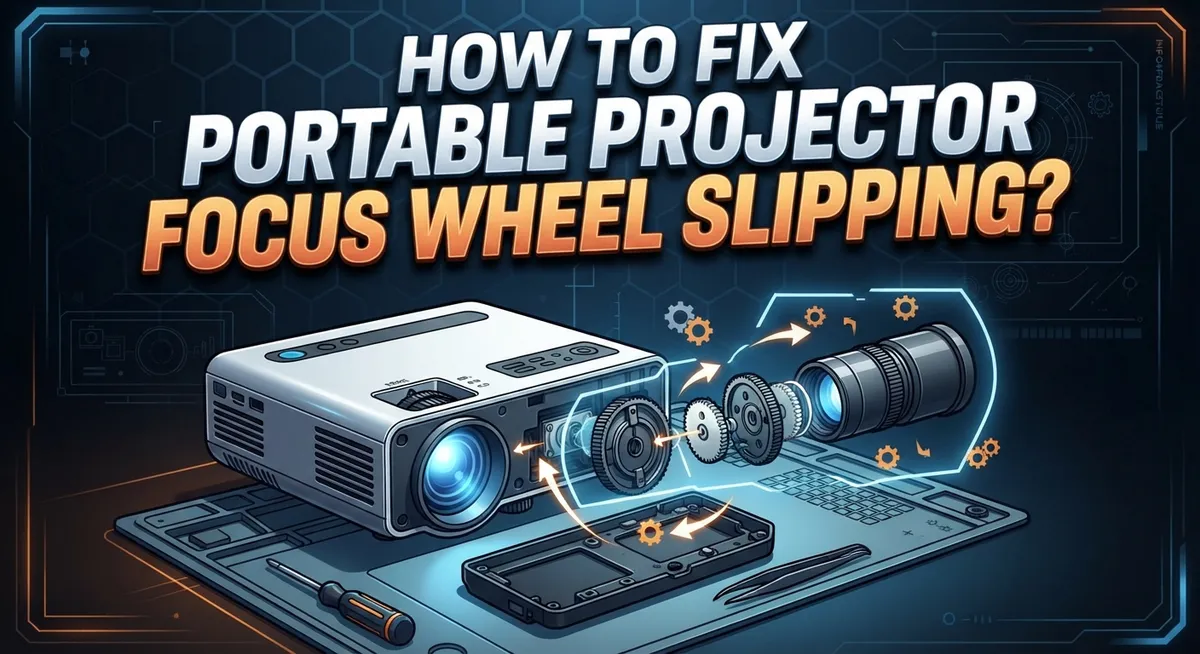
The focus wheel connects to a lens mechanism inside your projector. When you turn the wheel, it moves glass elements back and forth. This adjustment changes the distance between the lens and the image sensor. A sharp image appears when everything lines up perfectly.
Inside the focus wheel, you’ll find several important parts working together. A gear system transfers your hand movement to the lens. Small metal gears mesh together to create smooth rotation. Springs and bearings support these gears and keep them in place. All these components must work as a team.
The focus mechanism relies on precise alignment to function properly. Even tiny shifts in position can cause the wheel to slip. When parts move out of alignment, the gears no longer mesh correctly. This creates that frustrating spinning sensation without actual focus adjustment.
Your projector’s focus wheel also includes a friction system that provides resistance. This resistance helps you feel control when adjusting focus. Without it, the wheel would spin too freely. The friction comes from contact between different parts inside the mechanism.
Over time, this friction system wears down naturally. Parts loosen slightly from regular use and vibration. Temperature changes can also affect how components fit together. Understanding these normal wear patterns helps you catch problems early.
Regular inspection of your focus wheel keeps it functioning well. Check if the wheel turns smoothly and stops where you position it. Listen for grinding sounds during adjustment. These signs tell you when maintenance is needed before serious slipping occurs.
Common Causes of Focus Wheel Slipping
Dust accumulation is one of the most common reasons your focus wheel starts to slip. Dust particles settle inside the wheel mechanism and create friction that interferes with smooth rotation. When debris builds up, the wheel cannot grip the lens adjustment shaft properly, causing it to spin without moving the lens into focus.
Worn gears represent another major cause of focus wheel slipping. The internal gears that connect your focus wheel to the lens mechanism wear down after repeated use. This wear happens gradually over months or years of regular projector operation. Once the gear teeth become smooth or damaged, they lose their ability to grip each other effectively.
Loose internal screws can also trigger slipping problems. Your projector’s focus wheel assembly contains several small screws that hold components in place. Vibration from transport or regular use causes these screws to gradually loosen. When screws become loose, the focus wheel assembly shifts slightly, breaking the connection between the wheel and the lens mechanism.
Dried out or degraded lubricant causes slipping as well. The focus wheel mechanism relies on proper lubrication to function smoothly. Over time, the original lubricant dries up or becomes sticky, reducing the friction needed to turn the lens. This problem typically occurs in older projectors or those stored in dry environments.
Finally, manufacturing defects can cause focus wheel slipping from day one. Occasionally, the friction pads inside the wheel arrive damaged or poorly installed from the factory. If your projector slips immediately after purchase, contact the manufacturer for warranty support.
Understanding these causes helps you identify which fix will work best for your specific situation.
Tools You’ll Need Before You Start
Before you start fixing your portable projector’s focus wheel, gather the right tools. Having everything ready makes the repair process smooth and quick.
You will need a small screwdriver set with both Phillips and flathead options. Different screws inside your projector require different screwdriver types. A precision screwdriver kit works best for this job.
Get a clean microfiber cloth to remove dust and debris. Regular cloth can leave lint behind, which makes things worse. Microfiber cloths are gentle on delicate projector parts.
Compressed air is essential for cleaning tight spaces inside your projector. The air blows out dust without touching sensitive components. A manual air blower works just as well if you don’t have compressed air.
You should also have a magnifying glass or small flashlight handy. These tools help you see the focus wheel mechanism clearly. Better visibility means you spot problems faster.
Get some lubricant specifically designed for small mechanical parts. The right lubricant keeps gears moving smoothly without attracting dust. Avoid using general purpose oils that can damage electronics.
Grab a small container or tray to hold screws during disassembly. Losing screws makes reassembly impossible. A tray keeps everything organized and visible.
A gentle brush with soft bristles helps remove debris from tight corners. Avoid wire brushes that scratch delicate surfaces.
Finally, keep your projector’s manual nearby. The manual shows you exactly where screws are located and how the focus mechanism works. Some projectors have unique designs that require specific knowledge.
Having all these tools ready prevents frustration during repairs. You won’t waste time searching for missing items. Preparation is key to a successful focus wheel fix.
Step-by-Step Guide to Fixing a Slipping Focus Wheel
Now that you have your tools ready, let’s walk through the actual repair process. Start by turning off your projector and unplugging it from the power outlet. Wait at least 30 minutes for it to cool down completely. Safety comes first when working with electronic equipment.
Next, locate the focus wheel on your projector’s exterior. Most portable projectors have this wheel on the front or side of the lens barrel. Gently try rotating it to confirm the slipping problem. You should feel resistance as you turn it. If it spins too freely, slipping is definitely your issue.
Use your small screwdriver to carefully remove the screws holding the focus wheel housing in place. Keep these screws in your container so you don’t lose them. Take photos with your phone before removing anything. This helps you remember how everything fits back together.
Once the housing is open, use your compressed air to blow out any dust or debris. Hold the can upright and use short bursts. Let dust settle for a moment before proceeding. Inspect the gears and friction components with your magnifying glass or flashlight.
Look for worn teeth on the gears or a shiny, glazed appearance on friction surfaces. These signs indicate wear. Apply a small amount of lubricant to the friction points and gear teeth. Don’t use too much. A little goes a long way with mechanical parts.
Rotate the focus wheel by hand several times to work the lubricant in evenly. Wipe away any excess with your microfiber cloth. Reassemble the housing by reversing your removal steps. Plug in your projector and test the focus wheel. It should now turn with consistent resistance and no slipping.
Cleaning and Lubricating the Focus Mechanism
After you’ve cleaned out the dust and inspected the internal parts, it’s time to apply fresh lubricant to your focus mechanism. This step is crucial for restoring smooth operation to your projector’s focus wheel.
Start by identifying where the friction surfaces and gears meet inside the focus housing. These contact points are where you need to apply lubricant. Use a small applicator or thin brush to place lubricant directly on these areas. Avoid over applying, as excess lubricant can attract dust and create more problems down the line.
Apply the lubricant in small amounts to the gear teeth and friction pads. Work slowly and carefully around each component. Let the lubricant soak into the mechanism for a few minutes before reassembling anything. This waiting period allows the lubricant to penetrate dried out surfaces effectively.
Once the lubricant has settled, rotate the focus wheel gently by hand several times. This action distributes the lubricant evenly across all moving parts. You should feel the resistance decrease as the lubricant takes effect. The wheel should move more smoothly with each rotation.
Pay special attention to any stiff spots as you rotate the wheel. These areas may need additional lubricant or further cleaning. Apply a tiny bit more lubricant to problem areas if needed.
Check that the focus wheel doesn’t slip when you apply moderate pressure. The wheel should grip consistently without grinding or catching sounds. If slipping continues after lubrication, the gears may be too worn and need replacement.
Before closing up your projector, wipe away any excess lubricant with your microfiber cloth. This prevents dust from sticking to wet surfaces and causing future problems.
Tightening Loose Gears and Internal Components
When your focus wheel slips, the problem often lies in loose gears or internal components that have shifted over time. These parts need proper tightening to restore smooth operation and prevent further slipping.
Start by examining the gear assembly inside your projector’s focus mechanism. Look for any gears that appear misaligned or sit at odd angles compared to their neighbors. Gears that don’t mesh properly will cause the focus wheel to slip when you turn it.
Check the mounting brackets that hold the gears in place. These brackets typically have small screws that can loosen due to vibration from regular use or transportation. Use your small screwdriver to gently tighten each screw, but avoid over tightening as this can strip the threads or crack plastic components.
Inspect the shaft that connects your focus wheel to the internal gears. If this shaft feels wobbly when you apply gentle pressure, the retaining clip or collar may need adjustment. Some projectors use a small setscrew to lock the shaft in position, so check if this has become loose.
Look for any springs or tension mechanisms near the focus gears. These components maintain consistent pressure between moving parts. If a spring appears compressed or damaged, it may need repositioning or replacement to restore proper tension.
After tightening all visible fasteners, rotate the focus wheel slowly through its full range. The movement should feel smooth and consistent without any grinding sounds or sudden resistance. If slipping persists after tightening, the gears themselves may be worn and require professional service or component replacement.
Preventive Maintenance Tips to Avoid Future Slipping
Regular maintenance stops focus wheel problems before they start. You’ll spend far less time on repairs if you keep your projector clean and well cared for.
Clean your projector monthly, even if you use it rarely. Dust builds up inside the housing and settles on gears and friction surfaces. This buildup causes the wheel to slip over time. Use compressed air to blow out dust from all vents and openings on your projector’s exterior.
Store your projector in a dry location away from moisture. Humidity causes metal parts to corrode and rubber components to degrade. Both issues lead to slipping and poor focus control. Keep your projector in a climate controlled space whenever possible.
Avoid extreme temperature changes. Moving your projector from a cold room to a hot one creates condensation inside the housing. This moisture damages gears and reduces friction between moving parts. Let your projector sit for 30 minutes after transport before using it.
Handle the focus wheel gently during normal operation. Don’t force the wheel or apply excessive pressure when adjusting focus. Rough handling stresses internal components and speeds up wear. Use smooth, controlled motions when turning the wheel.
Inspect your focus wheel every few months. Rotate it slowly through its complete range and listen for grinding sounds or feel for resistance. Catch problems early before they become serious.
Store your projector with the focus wheel in a neutral position, not fully extended or compressed. This reduces stress on internal springs and gears during storage periods.
Run your projector monthly even if you don’t need it. This keeps lubricant distributed evenly and prevents components from seizing up. Just 10 minutes of operation helps maintain proper function and extends the life of your focus mechanism.
Troubleshooting Persistent Focus Issues
When your focus wheel continues to slip even after cleaning and lubrication, you need to dig deeper into the problem. Persistent slipping usually points to worn internal components or misaligned parts that simple fixes won’t resolve.
Start by checking the focus wheel’s grip on the drive shaft. The wheel should connect firmly to the shaft without any wobble. If you notice movement when you push the wheel sideways, the connection point has likely worn smooth. This happens because repeated use gradually smooths the contact surfaces between the wheel and shaft.
Inspect the rubber or textured coating on your focus wheel itself. Over time, this material deteriorates and becomes slippery. If the surface feels smooth or polished, friction has decreased significantly. You may need to restore grip by gently roughening the wheel’s surface with fine grit material, or the wheel may require replacement.
Check if the focus mechanism has internal damage. Listen carefully as you rotate the wheel slowly. Grinding sounds, clicking, or resistance indicate broken teeth on internal gears or damaged components. These parts cannot be repaired and must be replaced.
Test the focus wheel under different conditions. Does it slip only when you apply quick movements? Does it slip more when the projector is warm versus cold? This information helps identify whether thermal expansion plays a role or if mechanical wear is the main issue.
If slipping persists after these checks, the internal drive mechanism has likely suffered permanent damage. At this point, professional repair or component replacement becomes necessary because worn gears and damaged shafts cannot be fixed with basic maintenance techniques alone.
Final Thoughts
A slipping focus wheel feels frustrating, but most fixes are simple. You now know how to clean, tighten, and lubricate your projector’s focus mechanism.
Patience matters most during this process. Rushing through cleaning or tightening steps often leads to missed problems.
Take your time with each step. Check every screw twice. Test the wheel after each adjustment you make.
Small issues become big problems when ignored. A tiny bit of dust today becomes a jammed mechanism next month. Regular checks save you time and money later.
Your projector deserves consistent care, not just attention when something breaks. Think of maintenance like brushing your teeth. Do it regularly, and you avoid bigger issues down the road.
Remember that some problems need professional help. If you tried every fix and slipping continues, internal damage might be the cause. That’s normal for older units or heavily used projectors.
Professional repair services can access parts and tools you don’t have at home. They can also diagnose issues hiding beneath the surface.
Don’t feel discouraged if home fixes don’t solve everything. Projectors are mechanical devices, and mechanical devices wear out over time. This is expected, not a failure on your part.
Keep a simple maintenance schedule going forward. Mark your calendar for monthly checks. Note when you last cleaned or lubricated the focus mechanism.
This habit prevents future slipping issues before they start. A well maintained projector lasts longer and performs better.
Your focus wheel plays a small but important role in picture quality. Taking care of it means clearer, sharper images every time you watch something on screen.
Simple care today means fewer headaches tomorrow.
Frequently Asked Questions
Why does my focus wheel slip only sometimes instead of all the time?
Inconsistent slipping usually means the problem is getting worse gradually. Your focus wheel might slip when the projector warms up because internal parts expand slightly. It could also slip more when you adjust focus quickly versus slowly. Temperature and humidity changes affect how tight the grip stays on the drive shaft.
Can I use WD40 or similar products on the focus wheel?
General purpose sprays can work temporarily, but they attract dust and grime over time. This makes slipping worse, not better. Instead, use silicone based lubricants or specialized mechanical grease made for camera and projector equipment. These products stay cleaner longer and don’t degrade rubber components.
What’s the difference between a worn focus wheel and a damaged drive shaft?
A worn focus wheel feels smooth and slippery when you touch it. A damaged drive shaft usually causes grinding sounds or resistance when you turn the focus wheel. You can inspect the rubber coating on your wheel for cracks or flat spots. If the wheel looks fine but still slips, the problem is likely inside the mechanism.
How do I know if I need professional repair versus doing it myself?
Professional help makes sense if you see visible cracks in plastic parts or hear strange noises from inside. If basic cleaning and lubrication don’t help after two attempts, internal damage probably exists. Home fixes work best for dust buildup and loose fasteners. Professional technicians have replacement parts and specialized tools for internal repairs.
Is it safe to keep using a projector with a slipping focus wheel?
Yes, but picture quality suffers. A slipping focus wheel won’t damage other projector parts. However, constantly adjusting focus to compensate gets annoying quickly. Fix the problem soon to avoid developing bad habits with your equipment.

Hi, I’m Frankie Shaw, the founder and writer behind Swittchly 👋. I’m a passionate tech enthusiast who loves exploring the latest gadgets, devices, and electronics that hit the market. Through my honest, research-backed Amazon product reviews, I help readers make smarter buying decisions without the hype or confusion.