How To Fix Wearable Posture Corrector Haptic Motor Dying?
Your posture corrector buzzes every time you slouch. It taps your back like a gentle reminder to sit tall. But one day, the vibration feels weak. Then it stops completely.
This is a common problem with wearable posture correctors. The haptic motor inside works hard every day. Over time, it can wear out or lose connection.
The good news? You do not need to toss your device right away. Many haptic motor issues come from loose wires or weak connections. Others happen because of battery problems or worn out parts.
In a Nutshell
- A weak or dead haptic motor often comes from loose wiring, not a broken device. Check connections first before you give up on it.
- The circuit board should be secured tightly. Loops through the holes should pass through at least three times to keep it stable.
- Sew wires down firmly. Loose threads cause disconnections, and disconnections stop the buzz you rely on for feedback.
- Many correctors use simple microcontroller systems. These small boards control the vibration motor, so a software glitch can sometimes look like hardware failure.
- Do not wear your corrector all day, even after a fix. Constant use weakens your core and creates dependency on the device instead of building real habits.
- Pair your corrector with active muscle exercises. This combination gives better results than relying on buzzes alone.
- If problems continue after checking wiring and connections, the motor itself may need replacing.
Understanding How the Haptic Motor Works
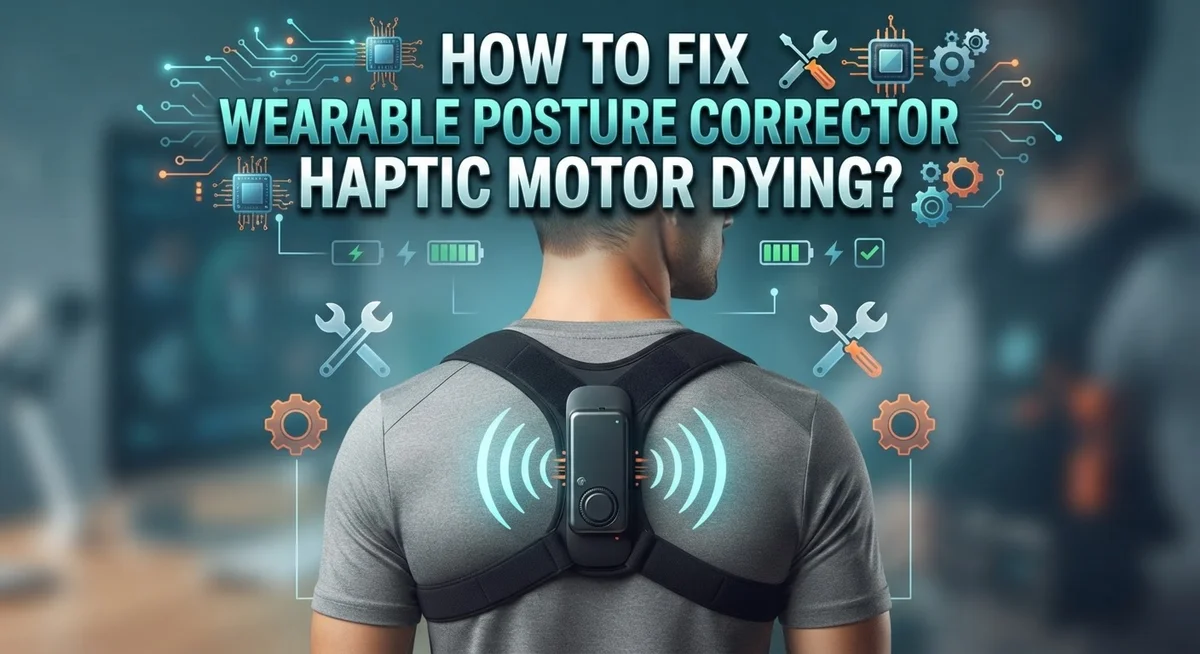
A haptic motor is the small vibrating component inside your posture corrector. It sends buzz signals to your skin when you slouch or move into bad posture positions.
Here’s how it works in simple terms. The motor receives electrical signals from a microcontroller, which is like the brain of your device. When the microcontroller detects poor posture through sensors, it tells the motor to vibrate. This vibration alerts you to adjust your position.
Most wearable posture correctors use basic electronic systems to power the motor. The microcontroller processes data from motion sensors and position detectors. These sensors track your spine alignment and shoulder angle. When measurements fall outside your target range, the system activates the motor instantly.
The haptic motor itself is a small rotating weight or actuator. As it spins, it creates the buzzing sensation against your skin. This tactile feedback trains your brain to recognize slouching automatically. Over time, you develop muscle memory for good posture without needing the buzz.
The entire system relies on three key components working together. First, the power source (usually a rechargeable battery) supplies energy. Second, the microcontroller processes sensor data and makes decisions. Third, the haptic motor converts electrical signals into physical vibrations.
When the motor starts dying, the buzz becomes weak or stops completely. This usually means the electrical connection is failing, not the motor itself. Loose wires or poor solder joints interrupt power flow to the motor. The circuit board may also shift slightly inside the device, breaking connections.
Understanding this process helps you diagnose problems faster. A weak buzz often means loose wiring, not a broken motor. Tight connections are essential for consistent haptic feedback throughout your device’s life.
Signs Your Haptic Motor Is Dying
Your haptic motor sends signals through vibrations. When it starts failing, you will notice specific warning signs before it stops working entirely.
Weak or Fading Vibrations are the first clue. Your corrector used to buzz strongly when you slouched. Now the vibration feels barely noticeable or inconsistent. You might miss the alerts completely during the day.
Delayed Responses happen next. The device detects poor posture but takes several seconds to vibrate. This lag means you are not getting real time feedback. Your muscles do not receive the immediate signal they need.
Intermittent Buzzing is another red flag. Your corrector vibrates sometimes but not every time you slouch. The pattern becomes unpredictable. One moment it works fine, the next moment nothing happens.
Strange Vibration Patterns can indicate motor wear. Instead of a steady buzz, you feel irregular pulses or stuttering vibrations. The motor might sound different too, making grinding or clicking noises instead of smooth humming.
No Vibration at All means the motor has likely died. You press the test button or slouch intentionally, but feel nothing. The device appears powered on since lights work, but the haptic feedback is completely gone.
Pay attention to when these signs started. Did they happen after you wore the corrector all day for weeks? Did you notice the motor dying after drops or impacts? This timing helps you understand what caused the failure.
Check if the vibrations return after the device sits unused for a few hours. Sometimes the motor overheats and needs rest. Temperature plays a role in motor performance.
These signs tell you exactly where the problem lies. Use them to decide whether you need simple fixes or motor replacement.
Diagnosing the Root Cause: Battery, Wiring, or Board
Your haptic motor might be dying, but the problem could be simpler than you think. Three main culprits cause motor failure: the battery, the wiring, or the circuit board itself. Let’s check each one systematically.
Start with the battery first. Remove your posture corrector and locate the power source. Check if the battery is fully charged. A weak battery cannot power the haptic motor properly, so it produces faint or no vibrations. Charge the device completely and test the motor again. If vibrations return to normal, your battery was the issue.
Next, inspect all wiring connections. Open the corrector carefully and look at the wires connecting the motor to the circuit board. Loose wires are the most common cause of motor failure. Wires can disconnect from vibration, sweat, or repeated bending. Gently tug each wire to confirm it is secure. If a wire feels loose, it needs to be reattached.
Check the circuit board last. The board controls power delivery to the motor. Look for visible damage like burnt spots, corrosion, or broken solder joints. Corrosion often appears as white or green crusty buildup. This happens when moisture enters the device. If you see corrosion, the board may need cleaning or replacement.
Document what you find. Take photos of loose wires, battery condition, and any board damage. This helps you decide if you can fix the problem yourself or need professional help. Most issues stem from loose wiring, which you can fix easily by securing connections tightly.
Step-by-Step Fix: Reconnecting and Securing Loose Wires
Start by powering off your device completely. This prevents electrical damage while you work on the connections.
Locate the haptic motor inside your corrector. It connects to the main circuit board through thin wires. These wires are often the culprit when vibrations weaken or stop.
Gently open your corrector’s casing. Use a soft tool to avoid puncturing the material. Look for any wires that appear loose, disconnected, or hanging freely from the motor terminals.
Check where each wire meets the circuit board. Press each connection point firmly. Sometimes a simple reconnection restores full function.
If a wire has come loose, carefully reattach it to its original position. Note the wire color before disconnecting anything. Most systems use red for positive power and black for ground connections.
Sew loose wires down to prevent future disconnection. Thread through the circuit board holes at least three times. This creates a secure anchor point that resists movement and vibration.
Inspect the solder joints where wires meet the board. Look for cracks, cold joints, or dull gray spots. These indicate poor electrical contact. If you spot damage, you may need professional repair.
Gently tug each wire to test its security. It should not move or separate from the connection point.
Test your corrector by powering it back on. Check if vibrations return to normal strength.
If the motor still fails after securing all wires, the issue likely involves the motor itself or the control board. Document your findings with photos before proceeding further. This helps you identify whether replacement parts are necessary.
Step-by-Step Fix: Resetting and Recalibrating the Motor
Resetting and recalibrating your haptic motor can often restore function without requiring replacement. This process clears temporary errors and reestablishes communication between your device’s control board and the motor itself.
Start by powering down your posture corrector completely. Wait at least 30 seconds before proceeding. This pause allows the circuit board to fully discharge and clears any stuck commands that might be preventing the motor from responding.
Locate the reset button on your device. Most posture correctors have a small reset button near the battery compartment or on the control board itself. Press and hold this button for 10 to 15 seconds. You should see a light flash or hear a beep indicating the reset has begun.
Release the button and wait another 30 seconds. During this time, the device is clearing its memory and preparing to recalibrate.
Power your corrector back on. The motor should now attempt to recalibrate automatically. You may notice a series of test vibrations as the system checks motor responsiveness.
If automatic recalibration doesn’t occur, manually trigger it through your device’s companion app or control panel. Look for a “calibrate motor” or “test haptic” option in the settings menu. Follow the on screen prompts carefully.
During recalibration, the motor will produce several distinct vibration patterns. Pay attention to whether these patterns feel consistent and strong. Weak or irregular vibrations during this test suggest deeper hardware issues.
Allow the recalibration process to complete fully. Don’t interrupt it or power off the device midway through. Once finished, test your corrector during normal use to confirm the haptic motor is functioning properly again.
Preventing Future Haptic Motor Failures
Preventing future haptic motor failures requires simple daily habits and smart maintenance routines. Your posture corrector works hard every day, so protecting it extends its lifespan significantly.
Start by limiting wear duration. Continuous all-day use stresses the haptic motor and drains your battery faster. Wear your corrector for 2 to 4 hours daily instead. This approach keeps the motor fresh while still activating your muscles effectively.
Keep moisture away from your device. Sweat and humidity damage circuit boards and motor components. Remove your corrector before exercising or showering. Store it in a dry location when not in use. If sweat does contact your device, wipe it dry immediately with a soft cloth.
Avoid extreme temperatures. Heat weakens battery performance and motor responsiveness. Never leave your corrector in direct sunlight or near heating vents. Cold temperatures also reduce motor efficiency. Store your device at room temperature.
Check your wiring monthly. Gently inspect all visible wires for damage or loose connections. Ensure nothing pulls or bends the wires sharply. Secure any loose wires by sewing them down through the circuit board holes at least 3 times.
Charge your battery properly. Use only the recommended charging method. Overcharging damages battery cells and reduces motor power output. Charge your device when the battery reaches 20 percent, not when completely dead.
Combine your corrector with active exercises. Don’t rely solely on your device to fix posture. Strengthen your core muscles through regular movement. This reduces dependency on the corrector and prevents muscle weakness that forces your motor to work harder.
These simple steps keep your haptic motor functioning reliably for months.
Common Mistakes When Troubleshooting Haptic Motors
Many people make simple mistakes when troubleshooting a failing haptic motor. These errors often make the problem worse instead of better. Understanding what not to do saves you time and prevents additional damage.
The biggest mistake is ignoring power completely. Some users try to troubleshoot while the device remains powered on. This risks electrical damage to your circuit board and can harm the motor further. Always power down your corrector before opening the casing or touching any internal components.
Another common error is applying too much force when inspecting wires. People often tug hard on wires to test their security. This aggressive handling can actually disconnect wires that were fine or tear delicate solder joints. Instead, use gentle pressure and visual inspection first.
Many users skip the reset step entirely. They assume the motor is broken and needs replacement when a simple recalibration would fix it. The reset process only takes minutes but solves most motor issues. Jumping straight to replacement wastes money and effort.
Moisture exposure during troubleshooting is another frequent mistake. Opening your device in humid bathrooms or near water sources invites sweat damage. Choose a dry, clean workspace before you start any repairs.
People also forget to test incrementally. After each fix, they should power the device on briefly to check if the motor responds. Testing after every step helps you identify exactly which fix solved the problem.
Finally, users often neglect to document what they find. Taking photos of wire positions before opening the casing prevents confusion during reassembly. Small notes about which wires connect where save significant frustration later.
When to Seek Professional Repair or Replacement
Your haptic motor might be beyond simple fixes. Knowing when to stop troubleshooting and seek help saves time and money.
Professional repair makes sense when basic steps fail. If resetting, cleaning, and checking wires don’t restore vibration, your motor likely has internal damage. Circuit board failures and motor coil problems require specialized equipment to diagnose properly. A repair technician can test components with precision tools you don’t have at home.
Consider replacement if repair costs approach device price. Many manufacturers offer replacement services that cost less than buying new. Contact your device maker directly for repair quotes. Some companies provide warranty coverage that covers motor failures within the first year.
Replacement is your best option if the device is old. Haptic motors typically last 2 to 3 years with regular use. If your corrector is beyond this range, investing in a new model makes more sense than repairing aging hardware. Newer devices often have better motor reliability and improved battery life.
Professional help becomes essential if you lack technical confidence. Opening your device incorrectly can damage other components. Sewing circuit boards and rewiring connections requires steady hands and knowledge. If you’ve never repaired electronics before, a technician prevents costly mistakes.
Document your troubleshooting steps before visiting a repair shop. Write down what you’ve already tried. Note when the motor stopped working and any events that preceded it. This information helps technicians diagnose problems faster.
Don’t waste weeks troubleshooting a dead motor. Request a professional evaluation after your initial reset attempts fail. Most repair services provide free diagnostics so you know exactly what you’re paying for before committing.
Final Thoughts
A dying haptic motor does not mean your posture corrector is useless. Most fixes are simple and quick.
Start with the basics. Check the battery, inspect the wiring, and reset the device. These steps solve most vibration problems.
Prevention matters more than repair. Limit wear time, keep your device dry, and avoid extreme temperatures. This extends motor life significantly.
Remember that circuit boards need secure connections. If you built or modified your device, sew wires down tightly. Loose connections cause many haptic failures.
Your posture corrector is a tool, not a solution. It reminds you to sit straighter, but it does not replace muscle strength. Combine it with exercises that build your core.
Do not rely on the device for all-day support. This weakens your muscles over time and creates unnecessary dependency on technology.
Know when to stop troubleshooting. If basic fixes fail after multiple attempts, professional repair or replacement makes sense. Do not force damaged components or ignore safety concerns.
Track your device’s age too. Motors typically last two to three years with regular use. Older devices may need replacement rather than repeated repairs.
Patience helps during troubleshooting. Test one fix at a time and note what works. This approach saves time and prevents further damage.
Good posture habits take time to build. Your corrector supports this journey, but consistency matters most. Use the device wisely, maintain it properly, and pair it with active movement.
With the right care, your posture corrector can serve you well for years. Simple maintenance keeps the haptic motor working and your posture improving steadily over time.
Frequently Asked Questions
Why is my haptic motor vibrating weakly or not at all?
A weak or silent motor usually means one of three things. First, check your battery level. A low battery reduces vibration intensity. Second, inspect the wiring connections between your circuit board and motor. Loose wires are the most common culprit. Third, dust or debris can block the motor’s movement. Clean around the motor gently with a dry cloth.
How do I know if my motor is actually dead or just needs reset?
Try a full device reset before assuming failure. Most posture correctors have a reset button or option in their app. Hold it for 10 to 15 seconds. If the motor vibrates after reset, it was just glitchy. If nothing happens, move to checking your battery and wiring. A truly dead motor won’t respond to any of these steps.
Can moisture damage the haptic motor?
Yes. Sweat and humidity can corrode connections and damage the motor over time. Always dry your device after wearing it. Store it in a dry place away from direct sunlight. If your device got wet, remove the battery immediately and let it air dry for 24 hours before powering it back on.
What’s the difference between a failing motor and a broken circuit board?
A failing motor vibrates weakly or inconsistently. A broken circuit board usually means no vibration at all, plus the device may not power on. If your device powers on but the motor stays silent, the motor is likely the problem. If the entire device is unresponsive, your circuit board may need attention.
Should I open the device myself to fix the motor?
Only if you have experience with electronics. Incorrect disassembly can damage other components permanently. If you’re unsure, professional repair is safer and often faster.

Hi, I’m Frankie Shaw, the founder and writer behind Swittchly 👋. I’m a passionate tech enthusiast who loves exploring the latest gadgets, devices, and electronics that hit the market. Through my honest, research-backed Amazon product reviews, I help readers make smarter buying decisions without the hype or confusion.